
Anchor Text Harvesting
This article explains how to crawl a single domain and generate a complete list of all external anchor text used.
This article explains how to crawl a single domain and generate a complete list of all external anchor text used.

 The time to completion depends on how busy the server farm is, but in most cases it takes about 24 hours. Once completed you will be able to download your results by using the Java app. You will need to activate it using your personal security token which is visible on any job results page.
 Download will start shortly after that and the output file will contain something similar to this:
80Legs
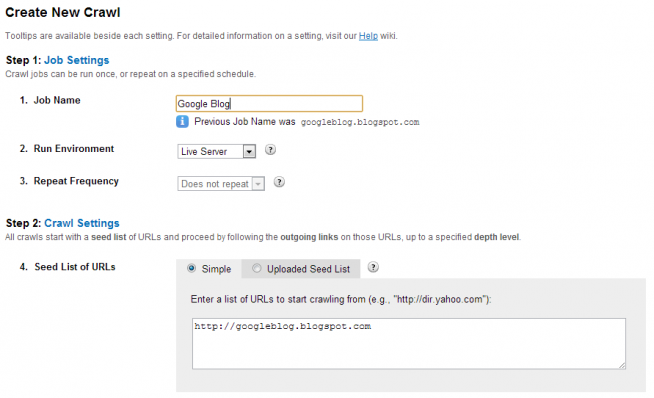
- Log into 80legs and create a new job. You can name it whatever you like.
- Add the URL of the domain you wish to crawl in the "Simple" mode of "Seed List of URLs" field.
- Set the parameters of "Outgoing Links to Crawl" settings (typically the third option)
- Paying customers can change the maximum number of crawls, otherwise leave it at 1000.
- Don't touch anything else. Hit "Create Crawl" and wait for the crawler to finish the job.
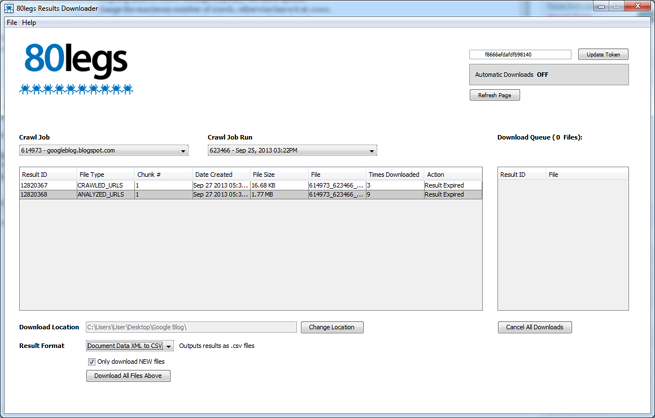
The time to completion depends on how busy the server farm is, but in most cases it takes about 24 hours. Once completed you will be able to download your results by using the Java app. You will need to activate it using your personal security token which is visible on any job results page.
- Load the Java downloader app and select Document Data "XML to CSV" in the results drop down.
- Select which local directory you wish to download to.
- Start download by clicking on the "ANALYZED_URL" row in the available download files.
Ancore
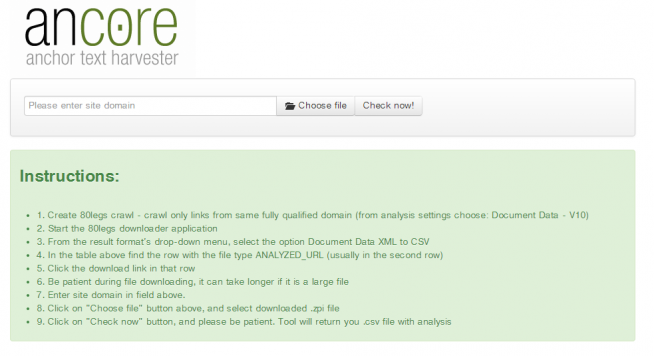
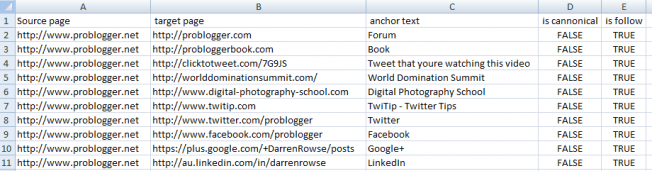
Ancore is a simple utility we built which converts the 80legs output file into a usable CSV formatted to show:- Linking URL
- Linked URL
- Anchor Text
- Canonical
- Nofollow
Download will start shortly after that and the output file will contain something similar to this: